Oct
02
Posted under
MS Office
The other day I Found A Fix for a recent problem I was having. The issue is described as follows;
Microsoft word goes into configuring microsoft office basic 2007 every time I open it.
Too fix, simply;
Type this into the RUN command;
reg add HKCU\Software\Microsoft\Office\12.0\Word\Options /v NoReReg /t REG_DWORD /d 1
Click OK if asked.
I hope you too have found a fix.
May
06
Posted under
Coding Below are a few useful modifications for the Twenty Eleven theme in WordPress.
1. How to remove the Search box.
Locate the HEADER.PHP file and remove the code below;
<?php

// Has the text been hidden?

if ( 'blank' == get_header_textcolor() ) :

?>

<div>

<?php get_search_form(); ?>

</div>

<?php

else :

?>

<?php get_search_form(); ?>

<?php endif; ?>
2. How to remove the Page Title description on each page.
Locate the CONTENT-PAGE.PHP file and remove the code below;
h1 class=”entry-title”><?php the_title(); ?></h1>
3. How to reduce whitespace below menu and Page Title .
Locate the STYLE.CSS file and add the code below to the end of the file;
#main,.singular.page .hentry{padding:0;}
4. How to modify the footer.
Change..
” title=”<?php esc_attr_e( ‘Semantic Personal Publishing Platform’, ‘twentyeleven’ ); ?>” rel=”generator”><?php printf( __( ‘Proudly powered by %s’, ‘twentyeleven’ ), ‘WordPress’ ); ?>
To
” title=”<?php esc_attr_e( ‘Semantic Personal Publishing Platform’, ‘twentyeleven’ ); ?>” rel=”generator”><?php printf( ‘Yoursite copyright 2011’ ); ?>
May
02
Posted under
Exchange,
IIS,
SBS,
Servers The other day I Found A Fix for a recent problem I was having. The issue is described as follows;
My clients new Nokia 920 windows phone could not connect to an SBS 2011 server running exchange 2010. All other smart devices connect no problem.
The phone could successfully setup the account but it would not sync. There error was as follows;
– Outlook Error
– Not Updated
– You’ll need a personal certificate to connect to remote.XXX.YYY
– error code: 85030027
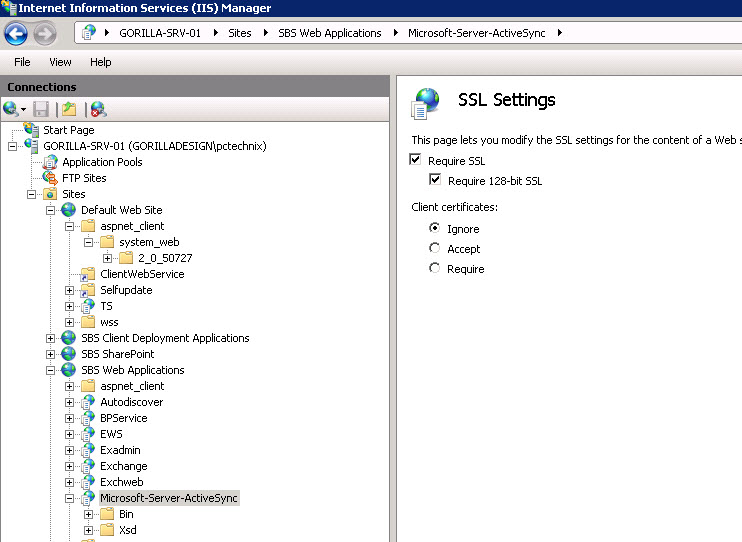
The solution was to open ISS Manager on the server, navigate to the Microsoft-Server-ActiveSync folder (as below) and in the SSL settings. set Client Certificates to IGNORE.
you’ll need a personal certificate to connect to
Outlook Error
Not Updated
You’ll need a personal certificate to connect to remote.XXX.com
last tried 11 minutes ago
error code: 85030027
I hope you too have found a fix.
May
02
Posted under
Encryption,
Laptops The other day I Found A Fix for a recent problem I was having. The issue is described as follows;
While trying to encrypt a laptop using Truecrypt, I realised I had no CD drive (or CD’s). Luckily there is a simple workaround you can use to bypass this requirement.
In the Run or Search box, type the following;
Alternatively type the path via the DOS Command Prompt i.e
– CD\
– Cd “C:\Program Files\Truecrypt”
– “TrueCrypt Format.exe” /n
I hope you too have found a fix.
Apr
04
Posted under
Office 365
The other day I Found A Fix for a recent problem I was having. The issue is described as follows;
I needed to be able to give myself send as access to another users mailboxes on Microsoft Office 365
To do this I found the following steps were required.
Note: Powershell commands are in bold. Type enter after each line item.
1. Install remaining script-lets so you’ll need to install the PowerShell from this link
2. Run Powershell as administrator.
3. Login to Office 365 with $cred=Get-Credential
4. Enter the admin username and password i.e name@mydomain.com and password.
Type;
Set-ExecutionPolicy Unrestricted
Now to Give permission to other users Mailboxes
$Session = New-PSSession -ConfigurationName Microsoft.Exchange -ConnectionUri https://ps.outlook.com/powershell/ -Credential $LiveCred -Authentication Basic -AllowRedirection
Import-PSSession $Session
To give Bob permission to Send as John
Add-RecipientPermission bob@pctechnix.ie -AccessRights SendAs -Trustee john@pctechnix.ie
To finish, enter Y and hit return.
I hope you too have found a fix.
Mar
08
Posted under
MS Outlook,
Office 365 Having recently migrated to office 365, I noticed a lot of resolution messages appearing in my Unread Mail folder in Outlook. These are actually harmless and generally by design.
To red rid of these messages please follow the steps below.
1. Right click Unread Mail folder in Outlook, and select Customize This Search Folder.
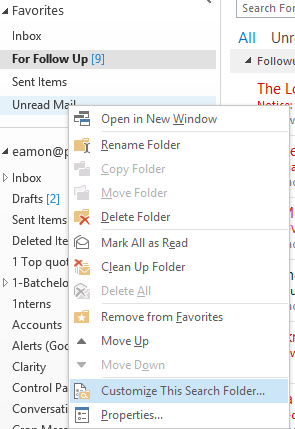
2. Click Browse, and then clear the mailbox (the top level) box.
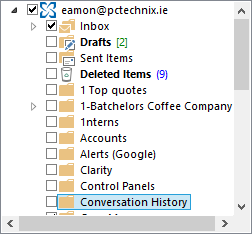
3. Select the folder that needs to appear in Unread Mail folder.
4. Click OK to save the settings.
After that, these sync issues messages won’t appear in Unread Mail folder.
I hope you too have Found a Fix!
Nov
18
Posted under
Office 365 The other day I Found A Fix for a recent problem I was having. The issue is described as follows;
Some of my recipients were reporting issues that mails I sent to them contained the winmail.dat file ONLY. This issue relates to how Office 365 sets the default attachment format to TNEF. Apple products and other non microsoft email clients in particular seemed to have problems reading my mails. The solution is to run the commands below in from the PowerShell fo Office 365.
To do this I found the following steps were required.
Note: Powershell commands are in bold. Type enter after each line item
1. Run Powershell as administrator.
2. Login to Office 365 with $cred=Get-Credential
3. Enter the admin username and password i.e name@domainname.com and password.
4. $Session = New-PSSession -ConfigurationName Microsoft.Exchange -ConnectionUri https://ps.outlook.com/powershell/ -Credential $LiveCred -Authentication Basic -AllowRedirection
If you receive an error with the above command type Set-ExecutionPolicy Unrestricted . Next, try the above command again.
5. Import-PSSession $Session
6. Set-RemoteDomain Default -TNEFEnabled $false
7. Remove-PSSession $Session
I hope you too have found a fix
Nov
18
Posted under
Office 365
The other day I Found A Fix for a recent problem I was having. The issue is described as follows;
I needed to be able to give myself full access to other users mailboxes on Microsoft Office 365
To do this I found the following steps were required.
Note: Powershell commands are in bold. Type enter after each line item.
1. Install remaining script-lets so you’ll need to install the PowerShell from this link
2. Run Powershell as administrator.
3. Login to Office 365 with $cred=Get-Credential
4. Enter the admin username and password i.e name@mydomain.com and password.
Type;
Set-ExecutionPolicy Unrestricted
Now to Give permission to other users Mailboxes
$Session = New-PSSession -ConfigurationName Microsoft.Exchange -ConnectionUri https://ps.outlook.com/powershell/ -Credential $LiveCred -Authentication Basic -AllowRedirection
Import-PSSession $Session
To give Billy full access to Jack’s mailbox use the following PowerShell Command.
Add-MailboxPermission -identity jack@mydomain.com -user billy@mydomain.com -AccessRights FullAccess
Or if you wanted to give Billy full access to all of the mailboxes..
Get-Mailbox | Add-mailboxpermission -user billy@mydomain.com -AccessRights FullAccess
I hope you too have found a fix.
Nov
17
Posted under
Office 365 The other day I Found A Fix for a recent problem I was having. The issue is described as follows;
I wanted to turn off the password expiry on all of my office 365 accounts.
To completely disable the password expiry for all (existing) email accounts you will need to install PowerShell. You will find the downloads along with instructions here.
Note: Powershell commands are in bold. Type enter after each line item.
1. Run Powershell as administrator.
2. Login to Office 365 with $cred=Get-Credential
3. Enter the admin username and password i.e name@domainname.com and password.
4. Enter the following commands
connect-MSOLService -credential $cred
Get-MSOLUser | Set-MSOlUser -PasswordNeverExpires $true
That’s it you’re done. Remember that you’ll need to redo this for every user added hereafter.
I hope you too have found a fix.
Sep
18
Posted under
Vista,
Windows 7 The other day I Found A Fix for a recent problem I was having. The issue is described as follows….
Windows would not boot beyond the BIOS. I received the following message ” Bootmgr is compressed Press CTRL + ALT + DEL to restart”.
To resolve and repair please do the following;
1. Boot from a Windows 7 (or VISTA) dvd.
2. Choose to repair and select by command prompt.
3. Type the following;
– C: and hit return (to make sure you are on the C: partition)
– Type bootrec /fixboot
– Type EXIT and reboot.
I hope you too have found a fix!
 Welcome to I FoundAFix.com - Where real answers are found! Our aim is to provide proven solutions to real problems. This website is a resource for tried and tested answers for everyday or obscure problems.